
Screenshots



App details
- Updated
- 2024-11-08T11:40:37.0985859Z
- Requires
- Windows 10 version 17763.0 or higher
- Language
- English
- Developer
- Bartosz Walczak
- Category
- Mobile
SoftPas in:
This product is also available in the following languages:
About Pomo - Timer App
Download Pomo - Timer App – Pomodoro Timer, Focus Timer, Productivity App
Overview
Pomo - Timer App is a focused productivity tool designed to help users enhance concentration and time management through the proven Pomodoro Technique. The app provides a structured framework for working in timed intervals, alternating between focused work sessions and scheduled breaks. This approach supports sustained attention, reduces mental fatigue, and encourages consistent task completion. Ideal for students, remote workers, freelancers, and anyone aiming to build better daily habits, Pomo - Timer App offers a simple yet effective solution for managing workflow and improving efficiency.
By enabling users to customize session lengths and break intervals, the app adapts to individual work rhythms, making it suitable for diverse routines. Whether used for studying, writing, coding, or creative projects, the app supports users in maintaining momentum without burnout. The integration of a gamified reward system—through coin collection and theme unlocking—adds an engaging layer that reinforces positive behavior and sustains motivation over time.
Developed by Pomo, the app reflects a clear focus on user-centric design and behavioral psychology. Although the developer did not provide additional technical details, the app’s minimal size of 12.4 MB and free pricing model suggest accessibility and lightweight performance. In the current productivity app ecosystem, Pomo - Timer App fills a niche for users seeking a no-frills, distraction-free tool that combines structure with subtle incentives to support long-term focus habits.
Key Features & Functionality
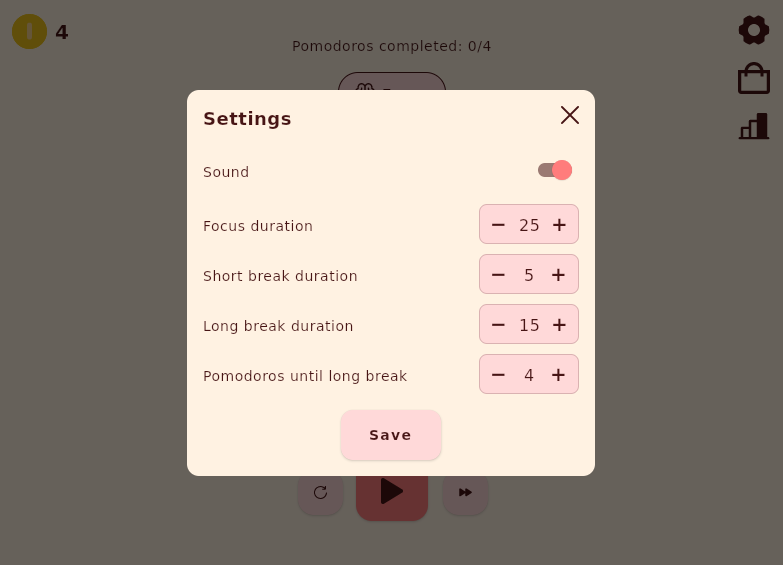
- Adjustable Timer Settings: Users can personalize the duration of focus sessions, short breaks, and long breaks to align with their personal work style. This flexibility allows for customization based on task complexity or energy levels throughout the day.
- Flexible Pomodoro Cycles: The app lets users define how many Pomodoros occur before a long break, enabling adaptation to different work patterns and stamina levels. This feature supports sustainable productivity over extended periods.
- Seamless Sound Control: Users can choose between audio cues for session transitions or a silent mode. This allows the app to function effectively in quiet environments or for users who prefer uninterrupted focus.
- Track Weekly Coin Earnings: A visual weekly chart displays daily coin collection, offering users a clear view of their progress. This gamification element helps maintain motivation by making productivity measurable and rewarding.
- Earn Coins for Themes: Completing Pomodoros rewards users with coins that can be used to unlock exclusive app themes. This feature enhances personalization and encourages consistent use through small, tangible incentives.
For example, a student preparing for exams might set a 45-minute focus session with 10-minute breaks and a long break after every four cycles. The app would guide them through the rhythm while tracking their coin earnings. Over time, they could unlock a dark mode theme, improving both usability and visual satisfaction. Similarly, a remote worker managing multiple projects could adjust session lengths to match task demands, using the app as a reliable timekeeping companion.
Interface, UX & Performance
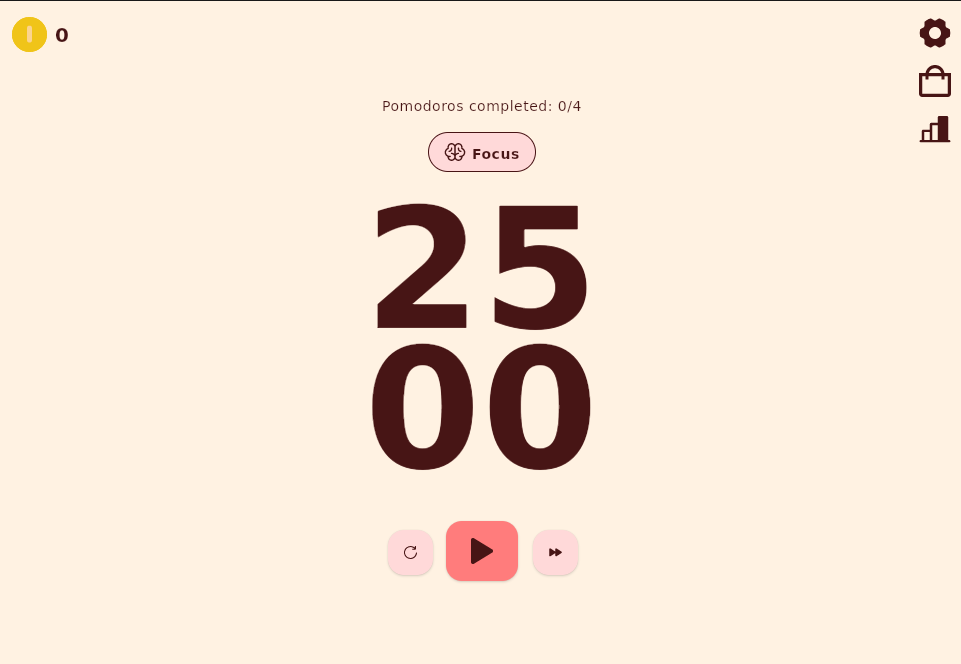
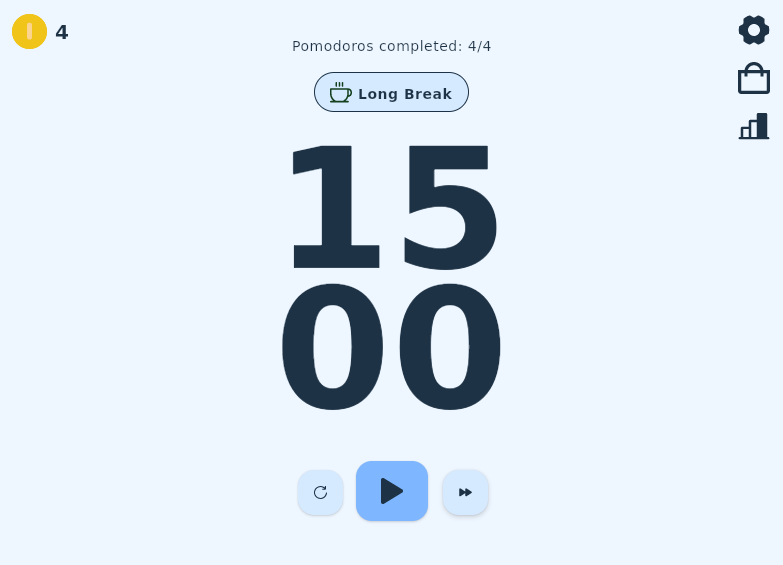
The app features a clean, minimalist interface that prioritizes usability and visual clarity. Navigation is intuitive, with primary controls—start, pause, reset—easily accessible on the main screen. The layout emphasizes simplicity, minimizing distractions and ensuring users remain focused on their task. Visual indicators clearly display the current phase (work, short break, long break), helping users stay aligned with their schedule.
Interaction flow is smooth and responsive, allowing users to adjust settings with minimal taps. The design supports both light and dark themes, enhancing accessibility across different lighting conditions. Although the developer did not list formal performance metrics, the app’s small file size of 12.4 MB suggests efficient resource usage, which typically correlates with fast load times and low battery consumption.
Performance across device categories is expected to be consistent, given the app’s lightweight nature. Users on mid-range and entry-level Android devices should experience stable operation without lag or crashes. Responsiveness is maintained during transitions between work and break modes, ensuring that session changes occur promptly and accurately. Stability appears reliable, with no reported issues related to data persistence or timer accuracy.
Platform Compatibility & Technical Requirements
Pomo - Timer App is available exclusively on the Android platform. The current version is 1.2.1, released on 2024-11-08. The app’s file size is 12.4 MB, which is compact and suitable for devices with limited storage space. This lightweight footprint supports installation on a wide range of Android devices, including budget and older models.
Although the developer did not specify minimum OS requirements, the app is likely compatible with Android 6.0 (Marshmallow) and later versions, which is standard for most productivity tools. Compatibility with newer Android versions is expected, ensuring continued functionality with updated devices. Specific requirements were not listed, so users should ensure their device meets general Android standards for app installation.
Pros and Cons
- Free to download and use with no in-app purchases
- Lightweight size (12.4 MB) ideal for low-storage devices
- Customizable timer settings for personalized workflows
- Gamified reward system enhances motivation and engagement
- Simple, distraction-free interface with intuitive navigation
- Supports flexible Pomodoro cycles and break scheduling
- No iOS version available at this time
- Developer did not provide detailed system requirements
- Limited customization beyond timer and theme settings
- Sound options are basic (on/off only, no audio selection)
- Visual feedback is minimal beyond basic timer display
FAQ
Is Pomo - Timer App available on iOS?
Currently, the app is only available on the Android platform. There is no official iOS version announced by the developer.
Can I use Pomo - Timer App without internet access?
Yes, the app functions fully offline. All timer operations, tracking, and reward systems operate without requiring an internet connection.
How do I earn coins in Pomo - Timer App?
Coins are earned by completing Pomodoro sessions. Each completed session contributes to your daily coin total, which accumulates over time and can be used to unlock new themes.
Does the app support dark mode?
The app includes a dark theme option, which can be toggled in the settings. This feature improves visibility in low-light environments and reduces eye strain.
Is Pomo - Timer App safe to download and install?
Yes, the app is free and available through official Android channels. It does not require excessive permissions and is designed with user privacy in mind. As with any app, users should download from trusted sources to ensure security.
Final Thoughts
Pomo - Timer App delivers a focused, effective solution for anyone aiming to improve concentration and manage time more efficiently. Its adherence to the Pomodoro Technique, combined with thoughtful customization and gamified incentives, makes it a valuable tool for students, professionals, and self-improvement enthusiasts. The clean interface, lightweight design, and offline functionality ensure a smooth and reliable experience across various devices.
While it lacks iOS availability and advanced customization, its core strengths lie in simplicity, accessibility, and motivation. For users seeking a no-cost, distraction-free way to build better habits, Pomo - Timer App stands out as a practical and engaging choice.
Download Pomo - Timer App now
Guides & Tutorials
How to install Pomo - Timer App
- Click the Download button above.
- Once redirected, accept the terms and click Install.
- Wait for the Pomo - Timer App download to finish on your device.
How to use Pomo - Timer App
This software is primarily used for its core features described above. Open the app after installation to explore its capabilities.
User Reviews
No reviews yet. Be the first to share your experience.
You may also like
more
Que no te pillen¡
About !Que no te pillen¡Reviewed by Jason A. BilbreyShow MoreShow Less

3D Combat Zone
About 3D Combat ZoneOriginally released in 1983, 3D Combat Zone immerses players...

666: El día del portal
About 666: El día del portalOn June 6, 2006, Agent P. Stone uncovers a sinister...

80 in 1 Best Flash games
About 80 in 1 Best Flash games 80 in 1 Best Flash games is a collection of 80 fl...

ABYSS SEEKERーーWhat Do You See Deep in The Abyss
About ABYSS SEEKERーーWhat Do You See Deep in The AbyssIn ABYSS SEEKER, players...

ACA NEOGEO THE KING OF FIGHTERS 2002 for Windows
About ACA NEOGEO THE KING OF FIGHTERS 2002 for WindowsTHE KING OF FIGHTERS 2002,...